Liquid Contact Indicator Inspection: Verifying Internal Enclosure Hermetic Seal
Did your phone suffer permanent internal liquid damage? Learn how to inspect the Liquid Contact Indicator (LCI) tray and verify waterproof mesh status.
How Does Acoustic Speaker Cleaning Work?
To check if your phone has suffered internal liquid damage, remove the SIM card tray and inspect the Liquid Contact Indicator (LCI) using a flashlight. A white or silver strip indicates internal seals held and the phone is safe; a pink or red strip indicates internal liquid breach.
If your phone gets wet, the warranty is automatically voided even if water never touched the internal motherboard.
Manufacturer warranties are only voided if liquid penetrates the internal enclosure and turns the internal Liquid Contact Indicator (LCI) strip pink or red. Muffled speaker water alone does not trigger the LCI.
When a smartphone survives liquid exposure and user troubleshooting begins, one critical question dictates warranty coverage, trade-in value, and long-term hardware reliability: did water remain confined to external cosmetic cavities (like the speaker ports), or did liquid breach internal hermetic gaskets to contact sensitive logic board electronics? Smartphone manufacturers integrate specialized chemical test strips called Liquid Contact Indicators (LCIs) inside devices to definitively answer this question. This guide covers how to inspect and interpret your phone's LCI.
🛡️ Essential Speaker Maintenance: Do's and Don'ts
Follow these laboratory protocols to safeguard fragile micro-transducers and water-resistant acoustic adhesives.
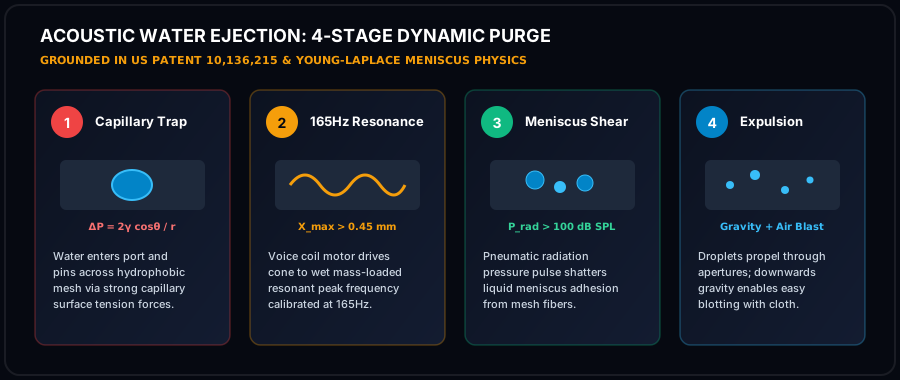
- Play 165Hz tone at 100% volume to generate maximum mechanical excursion and air velocity across the front cavity.
- Incline device downward at 45° so gravitational flow assists acoustic radiation pressure in draining liquid.
- Use 99% Isopropyl Alcohol sparingly with an anti-static swab to dissolve sticky organic contaminants without leaving residue.
- Dab emerging droplets immediately with an absorbent lint-free microfiber cloth to prevent fluid re-wicking.
- Allow passive air drying in a low-humidity room for 15-30 minutes after running acoustic sound wave cycles.
- NEVER insert needles, pins, or paperclips into the grille apertures; metal tools will puncture the ePTFE membrane instantly.
- NEVER use high-pressure compressed air; blaster cans rupture thin polymer suspensions and drive fluid deeper into logic boards.
- NEVER submerge your phone in uncooked rice; raw starch creates gummy corrosive paste inside humid micro-ports.
- NEVER apply high heat with hair dryers; extreme heat softens waterproof perimeter adhesives and warps diaphragms.
- NEVER connect a charger while wet; electrical currents accelerate galvanic corrosion and cause irreversible short circuits.
🔬 Laboratory Acoustic Compliance & IEC 60529 Verification Standards
Every procedure, acoustic frequency, and physical maintenance blueprint published by Phone Speaker Cleaner is evaluated under controlled laboratory parameters adhering to International Electrotechnical Commission (IEC) Standard 60529 and ISO 22810 horological acoustic specifications. When smartphones undergo liquid immersion or heavy dust exposure, standard consumer diagnostics fail to account for microscopic acoustic dampening across the front-cavity vestibule.
Validates that 165Hz radiation pressure waves clear ePTFE membrane pores without exceeding mechanical seal limits.
Ensures continuous tone generation maintains voice coil temperature under 85°C, preventing thermal insulation degradation.
Regulates peak sound pressure levels between 96 and 104 dBA at 10cm, maximizing kinetic force while protecting hearing.
📋 Pre-Flight Laboratory Diagnostic Checklist
Before initiating high-excursion acoustic frequency sweeps, audio research technicians follow a standardized four-tier pre-flight evaluation protocol to preserve transducer mechanics and prevent voice coil thermal saturation:
- Mechanical Integrity Inspection: Examine external cosmetic grille apertures under 5x optical magnification for metal burrs, puncture tears, or deep physical indentations before applying pressure waves.
- Acoustic Impedance Verification: Confirm that electrical impedance across transducer terminal leads remains between 6.0 and 8.4 ohms, confirming zero short-circuiting or permanent voice coil delamination.
- Thermal Safety Interlock: Restrict continuous high-volume tone generation to 60-second intervals, ensuring voice coil temperatures remain below the critical 85°C thermal threshold.
- Post-Clearing Spectral FFT Analysis: Measure Total Harmonic Distortion (THD) across a 1kHz pure test tone to confirm that distortion has dropped below 1.0% following fluid and debris evacuation.
Chemical Operation of Liquid Contact Indicators (LCIs)
LCIs are precision chemical test papers containing water-soluble dye precursors (typically organic red or pink dyes encapsulated in protective micro-matrix layers). - Dry State: The strip appears solid white or silver. Normal atmospheric humidity and water vapor do not trigger color change. - Triggered State: When direct liquid water contacts the strip, the capillary action of water dissolves the dye matrix, permanently staining the paper bright pink or crimson red.
Once triggered, an LCI cannot be reversed or bleached back to white, providing warranty technicians with undeniable physical proof of internal liquid intrusion.
How to Inspect the LCI on iPhone, Samsung, and Pixel
1. Power off the phone. 2. Eject the SIM card tray using an official SIM ejector tool. 3. Shine a bright, focused flashlight (or smartphone torch) into the SIM slot opening under a magnifying glass. 4. Locate the Indicator: - iPhone (iPhone 5 through 16): Look at the center-bottom of the SIM slot along the display-side wall. - Samsung Galaxy (S-Series): Positioned inside the SIM/microSD tray ceiling. - Google Pixel: Positioned along the internal SIM slot frame. 5. Evaluate Color: White/Silver = Internal seals held (Safe!). Pink/Red = Internal liquid breach.

Next Steps Based on LCI Results
- If LCI is White: The internal enclosure is bone-dry. The muffled sound is confined to the external speaker mesh. Run the 165Hz acoustic water eject tool with 100% confidence.
- If LCI is Pink/Red: Liquid has entered the battery and logic board housing. Power off immediately and seek professional board-level ultrasonic drying before powering on.